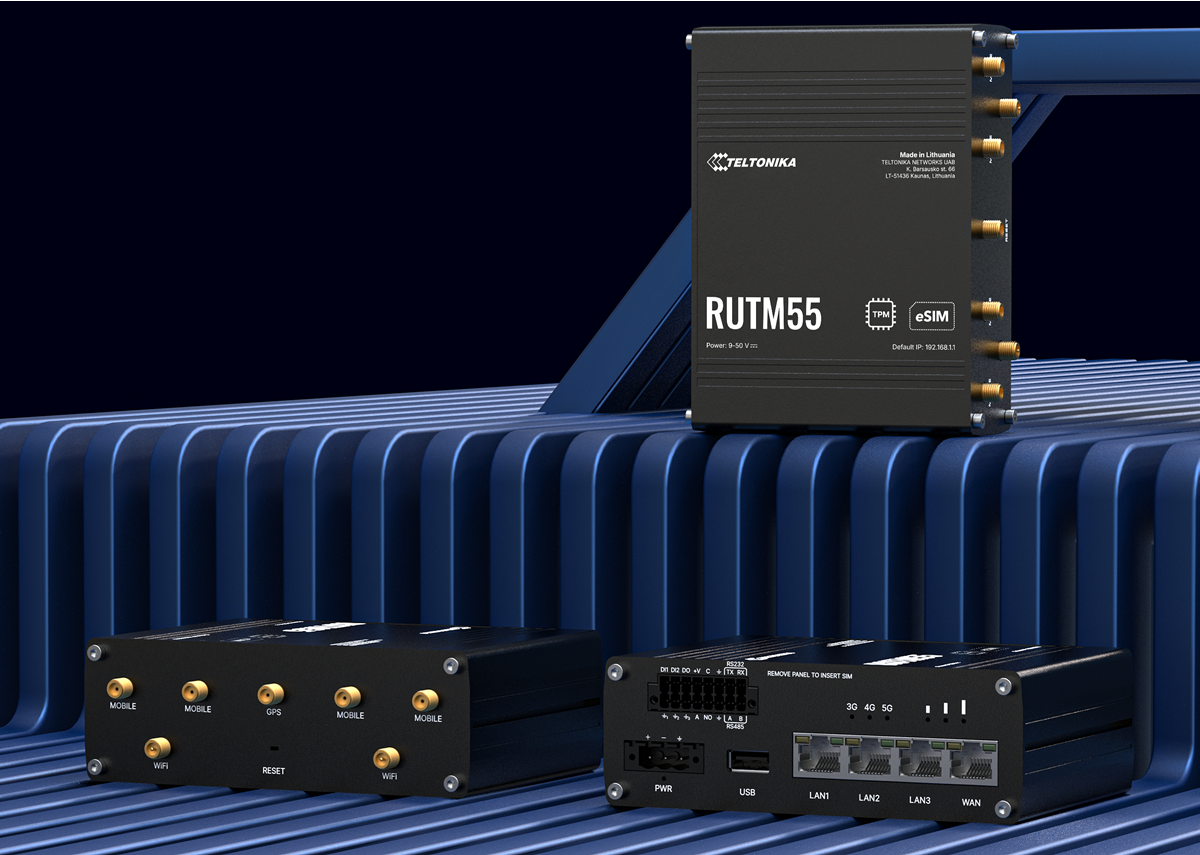
In the world of IoT, devices are only as useful as the network connections that support them. The Teltonika RUTM55 is a powerful tool in that toolbox. It’s not just another 5G router — it’s a full industrial connectivity platform designed to work hand-in-glove with modern IoT SIMs, roaming profiles, eSIMs, legacy systems, and demanding deployments. On iotsims.co.uk, we focus on SIM strategy: how to get reliable, cost-efficient data in the field. The RUTM55 gives you both the hardware and the flexibility to make that strategy work.
What Is the Teltonika RUTM55?
The RUTM55 is a rugged, industrial 5G router engineered for high throughput, multiple connection paths, and integration of legacy serial and I/O devices. Key things you’ll get:
- Sub-6 5G SA/NSA modem (up to ~3.4 Gbps DL, ~900/550 Mbps UL) with LTE fallback
- Dual physical SIM slots plus embedded eSIM, with support for up to 7 profiles
- Native RS232 + RS485 serial ports, digital inputs/outputs, analogue input, and relay
- Local LAN via 4× Gigabit Ethernet, Wi-Fi 5 for local wireless access
- GNSS built-in for geolocation or time synchronisation
But hardware is only half the story. The other half is how you connect it: SIM choices, data rates, roaming, failover, etc. That’s where the RUTM55 shines, assuming you choose your SIM(s) and configuration properly.

Why SIM Strategy Matters (Especially With 5G)
Using an IoT SIM in a 5G environment is different from 3G/4G. Key considerations include:
- Throughput vs data cost — 5G can deliver huge speeds, but data plans must align: per-GB rates, burst limits, throttling policies all matter.
- Latency & jitter — For telemetry, remote control, or video, you’ll care about latency. 5G typically reduces this, but only if your SIM, operator, and network slice play along.
- Roaming & multi-network options — Sites may be in remote or fringe areas. Having SIMs that can roam or switch networks is a big plus.
- Regulations & compliance — Freight across borders, deployments in regulated sectors — make sure your SIM provider supports global/regional roaming, lawful intercept, etc.
- Redundancy & uptime — Physical SIMs can fail, networks can go down. Options like eSIM, dual-SIM, and fallback matter.
The RUTM55 supports all of that: you can use IoT SIMs, roaming SIMs, eSIM profiles, and you can set up automatic switching rules.

SIM Options for the RUTM55
Here are your main SIM-type options with the RUTM55, and what to watch out for with each:
| SIM Type | Benefits | Things to Check |
|---|---|---|
| IoT/M2M-only SIMs | Usually cheaper per-GB, fixed IP or private APN, better SLAs, reliability. | Data caps, uplink vs downlink rates, roaming permissions, latency guarantees. |
| Roaming / multi-network SIMs | Allows the router to pick the best available network; useful in rural or cross-border use. | Roaming costs, local operator choices, regulatory restrictions, fallback behaviour. |
| eSIM (embedded SIM) | Flexibility to provision or change profiles remotely; fewer physical interventions. | Supported operators, profile download cost, compatibility, number of profiles, management tools. |
The RUTM55 supports all three. You can run two physical SIMs plus an eSIM. Use rules for switching: if SIM 1 loses signal, or data cap reached, or roaming is blocked, switch to SIM 2 or activate eSIM. Combine with private APNs and VPNs for security.
Practical Tips for Using IoT SIMs with the RUTM55
- Choose IoT-friendly plans — avoid headline “unlimited” consumer plans with throttling. Get plans where upload performance is preserved.
- Monitor usage per SIM — since you may be switching SIMs, track data usage per profile to avoid unexpected overages.
- Set thresholds for switching — e.g. signal < -100 dBm, or error rates, or latency thresholds. These trigger SIM or eSIM switches.
- Use redundant SIM paths — physically (dual SIM) and logically (eSIM) redundant. Better for uptime.
- Think about IP addressing early — if using private APN or static IPs, ensure SIMs support that; for roaming SIMs, IP may float.
- Security — always use VPN (WireGuard, IPsec), private APNs, and secure credentials; ensure firmware updates and management via RMS or similar tools.
Product Description
The Teltonika RUTM55 is built for deployments where you need more than just raw speed. It delivers 5G SA/NSA connectivity, LTE fallback, and combines that with a triple-SIM strategy (dual physical + embedded eSIM). For IoT systems, that means you can deploy flexibly, adjust carrier relationships over time, and ensure failover if one network degrades.
It also supports legacy protocols (serial RS232/RS485), digital/analog I/O and relay control, meaning older sensors, controllers and meters can be preserved rather than replaced. Wi-Fi 5 and Gigabit Ethernet allow local network connectivity and edge device access. Rugged design (wide voltage, temperature tolerances) and GNSS support round out the profile for IoT in harsh, remote, or mobile environments.
Key Features
- Dual physical SIM + embedded eSIM with up to 7 profiles
- Automatic SIM/eSIM switching based on signal, roaming, data/SMS quotas, network state
- 5G Sub-6 GHz (SA & NSA), high DL/UL throughput, and LTE fallback
- Legacy serial ports RS232 & RS485; digital and analog I/O; relay outputs
- Gigabit Ethernet LAN/WAN, Wi-Fi 5 dual band; GNSS receiver
- Industrial specification: wide power input, –40…+75 °C, metal housing, IP30
- Secure connectivity: VPNs, firewall, private APN support
5G Antennas, IoT Antennas & Installation Advice
To get the best out of the RUTM55 (especially in 5G), antenna selection and installation are just as important as SIM choice.
Antenna Types & Selection
- MIMO Cellular Antennas: For full 5G performance, a 4×4 MIMO antenna (4 cellular elements) is ideal. If space or budget limits you, 2×2 MIMO is usable but throughput will be less.
- Roof-mount / Pole-mount vs Magnetic & Panel: Roof-mount or pole-mount gives better height and exposure. Magnetic or panel/mast-mounted are good for vehicles or small enclosures.
- Low-loss cable: Every metre of poor cable costs signal. Use cable types that minimise signal loss—LMR or equivalent.
- Omni vs Directional: Omni for general coverage; directional panel for pointing at known mast.
Installation Tips
- Mount antennas as high as possible with unobstructed view to mast. Metal surfaces can block or reflect signals.
- Keep Wi-Fi antennas away from cellular ones, or isolate with antenna types that reduce mutual interference.
- Ensure grounding and lightning protection if antennas are external and exposed.
- Environment: temperature swings, moisture, dust — router enclosures should provide protection; check IP rating of antennas.
IoT Antenna Considerations
- IoT SIMs often operate in remote or fringe locations — signal strength tends to be weak; external antenna with good gain helps a lot.
- Battery-powered or solar-powered installations must minimise losses; use short high-quality cables and efficient antennas.
- For stationary assets, once positioned and tested, document mounting, cable runs, angle etc. Remote monitoring of signal/RSSI helps detect degrading performance.
Applications / Use Cases
- Smart metering & AMI/AMR deployments where SIMs need to be swapped or shared across operators.
- Water, gas or power network monitoring with legacy sensors and variable connectivity.
- Transport assets (e.g. trailers, containers) moving across borders, needing roaming and flexible SIM usage.
- Renewable sites (solar/wind) in remote areas — combining IoT SIMs with eSIM backups.
- Industry 4.0 factories with legacy PLCs and HMIs, needing secure remote access and uptime.
Why Choose iotsims.co.uk for Your SIMs
Because having the right SIM is almost as important as having the right router. At iotsims.co.uk, we offer:
- Flexible IoT SIM plans designed for high uptime and consistent performance
- Multi-network / roaming SIMs for resilience in remote or mobile settings
- Static IP / Private APN support
- Transparent usage and switch rules, so you know what triggers roaming, failover, or extra cost
- Support in planning: advice on antenna, signal, SIM profile combinations
Conclusion
The Teltonika RUTM55 is one of those rare routers that gets both hardware and connectivity strategy right. Pairing it with smart SIM choices — whether IoT SIMs, roaming, or eSIM profiles — lets you build systems that stay connected, secure, and ready for whatever networks throw at them.
For deployments that expect to stick around, or that cross borders, or that must endure poor signal or infrastructure changes — the RUTM55 is a strong central piece. And with the right SIMs, you get more value, less downtime, and genuine resilience.
Leave a Reply