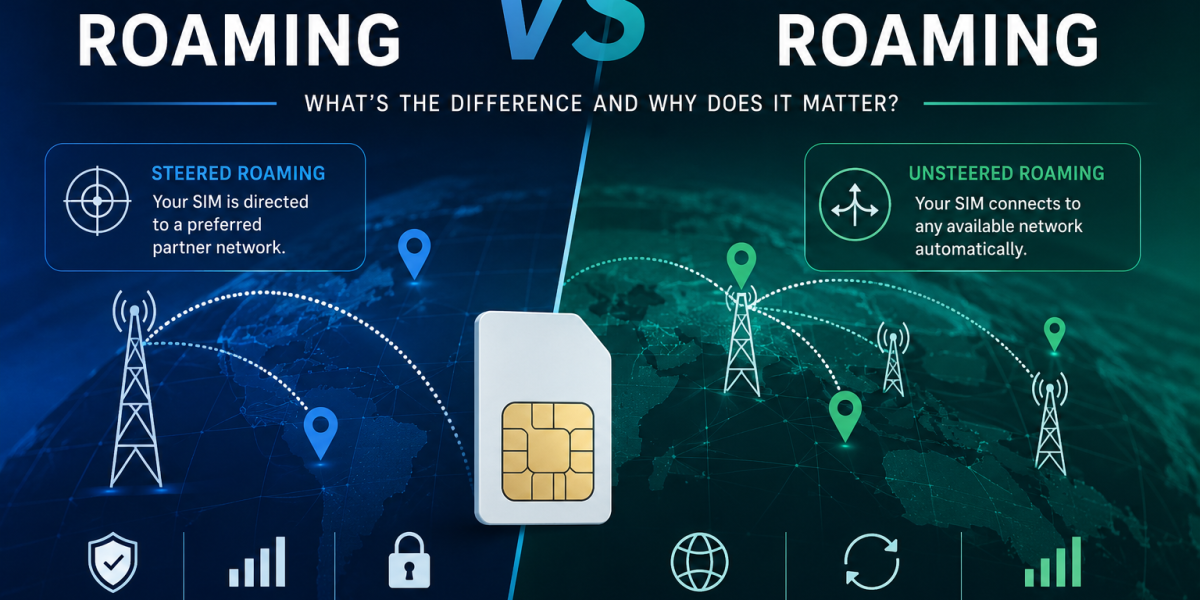
Steered vs Unsteered Roaming: The Hidden Reason IoT Devices Drop Off Networks They Should Reach
If you’ve ever had a tracker, meter, or controller go quiet in the field for no obvious reason — signal bars showing fine on a nearby phone, device still powered, but the connection just won’t hold — there’s a good chance roaming steering is part of the story. Not the whole story, but a part nearly nobody checks.
This is one of the least-explained specs in IoT connectivity. It governs which mobile network your device actually connects to when it’s away from its home network, and getting it wrong is one of the more common, least-diagnosed reasons IoT deployments develop “mystery” dead zones that don’t show up on any coverage map. It isn’t the only cause of dropped connections — we’ll come back to that at the end — but it’s the one most likely to be silently working against you without anyone realising.
What roaming steering actually is
Every IoT SIM that supports roaming has access to multiple mobile networks in a given country, not just one. Steered and unsteered roaming describe two completely different ways your device decides which of those networks to connect to.
Steered roaming: the SIM profile contains a Preferred Roaming List (PRL) set by the network operator or SIM provider. When your device powers on, it doesn’t survey the available networks and pick the best one. It looks at the PRL and connects to whichever network is listed first, regardless of signal strength at that specific location. If that preferred network has a black spot exactly where your device sits, the device either drops to a much weaker connection or fails to connect at all, even if a different network has full bars two metres away.
Unsteered roaming: the device’s modem evaluates all available networks in real time and connects to whichever has the strongest, most stable signal at that moment. No preference list, no operator steering. If the primary network degrades, the device can hop to an alternative network automatically.
This applies whether you’re running a physical SIM or an eSIM/eUICC profile — steering behaviour is set at the profile level, not the form factor, though multi-IMSI eSIM setups add another layer worth understanding since they can switch between several network identities on the same physical SIM.
The difference looks small on paper. In the field it’s the difference between a fleet tracker that updates every two minutes from a moving vehicle, and one that vanishes for hours at a time on a route it drives daily.
Why this gets overlooked
Most generic SIM cards, including a lot of “IoT SIMs” sold without much technical detail, are steered by default because steering lets operators control roaming costs and direct traffic to partner networks they have commercial agreements with. That’s a reasonable trade-off for a phone in someone’s pocket, where the user notices a dropped bar and the phone re-negotiates a connection in seconds.
It’s a much worse trade-off for an unattended device bolted to a refrigerated trailer, buried in a utility cabinet, or mounted on plant machinery, where nobody’s watching the signal bar and a dropped connection might not get noticed until a report fails to arrive.
How this connects to APNs
The roaming question doesn’t exist in isolation — it’s tied directly to how your device’s traffic gets routed once it does connect, which comes down to the APN (Access Point Name).
The APN isn’t just a string you type into a config screen. It’s the gateway configuration that tells the network’s core system three things: which routing path your data takes, what kind of IP address you get assigned, and which part of the network (public internet or a private/dedicated segment) your device lands on.
A public APN routes your device onto the open internet, typically with a dynamic (sometimes shared, carrier-grade NAT) IP address. It’s simple, works out of the box, and is fine for devices that only need to phone home to a cloud platform.
A private or dedicated APN routes your device’s traffic onto a closed network segment that doesn’t touch the public internet directly. Access in and out usually requires a VPN tunnel or a fixed corporate connection. This is the standard choice for anything where unauthorised inbound access would be a genuine problem.
Public IP vs private IP: the trade-off in plain terms
This is where roaming, APNs, and security all meet.
Public static IP: your device is directly reachable from the internet at a fixed address. Useful when you need to remotely manage a device — push configuration changes, pull diagnostics, SSH into a router — without setting up a VPN first. The cost is a larger attack surface: anything with that IP address is a potential target for scanning and probing, so it needs its own access controls (firewall rules, strong authentication, closed unused ports) rather than relying on network obscurity.
Private IP (behind NAT or a closed APN): your device isn’t directly reachable from the open internet at all. It can usually still initiate outbound connections (reporting to a platform, sending data), but nothing can reach in without going through a VPN or the network operator’s own gateway. This is safer by default, but adds a layer of complexity if you ever need remote, on-demand access to the device itself.
Neither is universally “more correct.” A smart meter that only ever needs to push readings outward has no real need for a public IP. A remote industrial gateway that field engineers need to log into on demand often does, but should be locked down hard if it has one.
SIM security: it’s mostly an architecture decision, not a SIM feature
IoT SIMs aren’t usually targeted the way consumer SIMs are for SIM-swap fraud, since there’s no human account to socially engineer. But that doesn’t mean security is irrelevant, it just shifts up a layer.
The controls that actually matter:
- IMEI locking — binding the SIM to a specific device’s hardware identifier so a stolen SIM can’t simply be moved into another device and used.
- APN-level firewalling — restricting what a device on a private APN can actually talk to, even within your own network, rather than assuming “private” automatically means “safe.”
- PIN/PUK management — basic, often skipped on IoT deployments because it adds a step to provisioning, but worth it for anything physically accessible to the public.
- Roaming and routing choices as security controls — a private APN with a VPN tunnel isn’t just a networking decision, it’s arguably your strongest security layer, because it removes the device from the public internet’s attack surface entirely rather than relying on the device’s own firewall to hold the line.
Most security advice for IoT focuses entirely on the device layer, locking down firmware and ports. That’s necessary but incomplete. The network architecture underneath it, steered or unsteered, public or private APN, public or private IP, is just as much a security decision as it is a connectivity one.
Matching roaming and network type to the application
Putting it together, here’s how this plays out across common IoT use cases.
| Application | Roaming | IP type | Why |
|---|---|---|---|
| Fleet tracking / mobile assets | Unsteered | Public or private, dynamic | Asset moves across coverage areas constantly; steering creates dead zones on real routes |
| Vending / smart lockers (fixed site) | Steered usually fine | Private, dynamic | Fixed location means steering risk is a one-time check, not a moving problem |
| Industrial PLCs / control systems | Unsteered preferred | Private static, VPN | Uptime is critical; static addressing needed for reliable remote access; private network reduces attack surface |
| Smart metering / environmental sensors | Steered usually fine | Private, dynamic | Low data volume, fixed location, outbound-only traffic; security favours private/closed network |
| Digital signage / remote displays | Steered usually fine | Public static (for remote push) or private + VPN | Needs reliable inbound management access; trade-off depends on how sensitive the network is |
The SIM is one piece, not the whole picture
Everything above is real and worth getting right. But it would be misleading to leave you thinking a correctly specified SIM guarantees a reliable connection on its own. It doesn’t. The roaming profile is one layer in a stack, and the other layers can just as easily make or break a deployment.
Router configuration. Most industrial routers let you set network selection independently of whatever’s on the SIM, auto-select, lock to a named operator, or define your own preference order. A router overriding an unsteered SIM with its own locked network setting gets you right back to the same dead-zone problem from a different direction. The SIM and the router need to agree, and checking that they do is a five-minute job most installs skip.
Ping/reboot watchdog. This unglamorous setting catches more real-world dropouts than almost anything else on this page. A router periodically pinging a known host and power-cycling the modem if it fails will paper over a wide range of underlying issues, congestion, a stuck modem, a flaky session, regardless of whether steering was the original cause. A device without watchdog reboot configured can sit offline for hours after a problem that would otherwise self-resolve in under a minute.
Antenna placement and gain. A lot of “connectivity problems” are actually signal-loss problems that never reach the SIM question at all. Devices mounted inside steel cabinets, underground enclosures, or behind dense building structure often need an external, higher-gain antenna correctly positioned, not a better SIM. Diagnosing this as a roaming issue when it’s actually an antenna issue wastes time and doesn’t fix anything.
Firmware and modem behaviour. Different modem chipsets handle network re-selection with different levels of aggression and reliability, and firmware updates change this behaviour over time. The same SIM profile can behave differently in two routers with different modems.
None of this is a reason to skip getting the SIM right, it’s the reason to get everything right together. A SIM provider who only thinks about the SIM will get you a correctly steered profile and nothing else, leaving the router, antenna, and watchdog configuration to chance or to whoever happens to be on site. A supplier who understands how the SIM, the router, the antenna, and the failover logic all interact is in a much stronger position to actually deliver a connection that stays up, because they’re solving the whole problem rather than one ingredient of it. That’s worth asking about directly when you’re choosing who to buy connectivity from: do they just sell SIMs, or do they understand the full stack the SIM has to work inside?
The bottom line
If you’re spec’ing connectivity for an unattended IoT device, roaming steering is the variable that gets the least attention and explains a surprising amount of unexplained field failures. It’s worth asking your SIM provider directly: is this profile steered or unsteered, and what’s on the preferred network list? Most generic SIM resellers won’t have a confident answer. But don’t stop there, the SIM is one part of a stack that includes the router’s settings, the watchdog configuration, and the antenna it’s plugged into. Getting all of it right, together, is what actually keeps a device online.
Internal links used above: eUICC/eSIM profile mechanics → euicc.co.uk; multi-IMSI eSIM → sgp32.co.uk; ping/reboot watchdog setup → pingreboot.co.uk; external antennas for IoT routers → iotantenna.co.uk. Consider also linking device-specific SIM guidance (e.g. PLC/industrial controllers) → iotportal.co.uk, and router config deep dives → iotrouters.com once that content is live.
[…] If it is not, you have learned something important. A multi-network SIM sitting on the one operator with the worst coverage at that postcode is not a broken SIM. It is a SIM doing exactly what it was told to do, which may not be what you were told it would do. That difference is steering, and it is worth understanding before you blame anyone: Steered vs Unsteered Roaming. […]